Console BoostExclusive PerksGTA6 Free for a Limited Time
Guangnian Booster GTA6 Console Boost Guide: Enter GTA6 for 7 Days, Join the Group for a 30-Day Monthly Pass
Quick Read · 30 seconds LoriType Description 39 locations
Source credited: official materials from Guangnian Accelerator (client tutorial and free-access announcement)
What is Guangnian Booster
Lightyear Accelerator(gnjiasu.com) is a game network accelerator product operated by our site's team. PC client 1.1.38 Version officially launches console acceleration: no longer need a separate hardware box—a single PC running the client can provide network acceleration for consoles on the same network, supporting PS5 / PS4、Xbox、Switch、Steam Deck.
Image source: Rockstar Games official screenshot (Jason)
GTA6 Console Boosting Steps (PS5 Example)
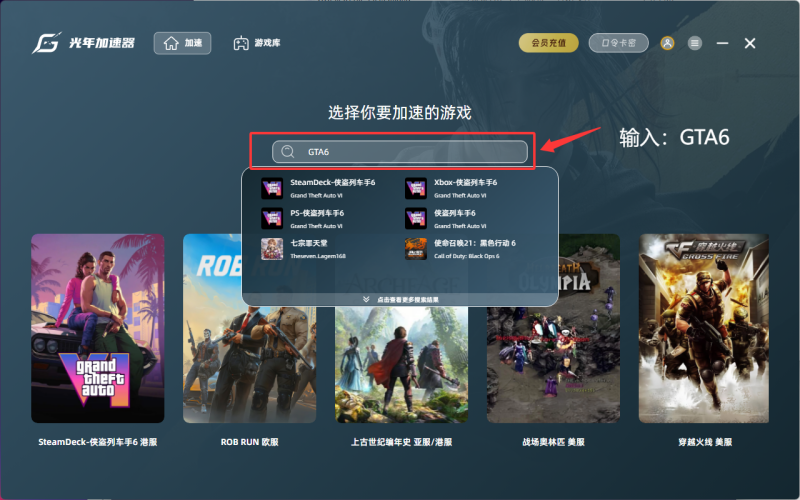
-Pure Black- · 1.066 million views: connect your PC and console to the same network, open the Lightyear client, type "GTA6" in the homepage search bar and press Enter.
Search GTA6 on the client homepage · Screenshot source: official Guangnian Booster tutorial
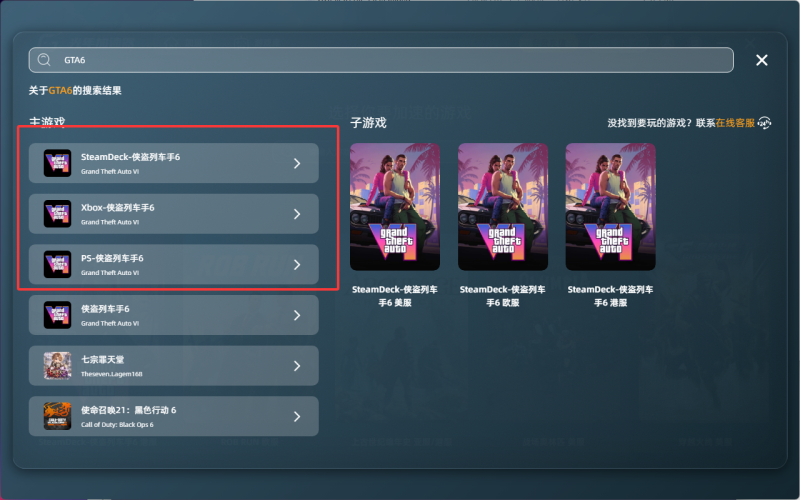
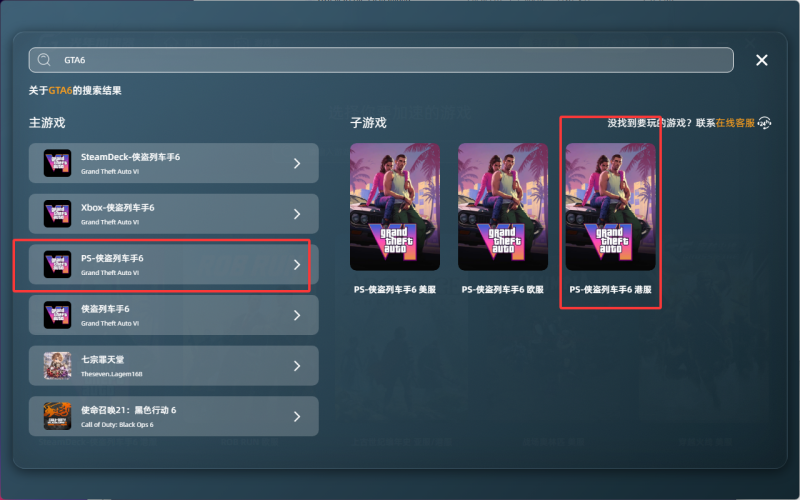
Ao Changzhang · 510K views: in the search results, choose the console platform entry on the left, click "PS - Grand Theft Auto VI", pick a region/server (e.g., HK) and click Accelerate.
Main game list: SteamDeck / Xbox / PS4 / PS5 versions · Screenshot source: official Guangnian Booster tutorialSub-games on the right are listed by region; select the Hong Kong server to boost · Screenshot source: official Guangnian Booster tutorial
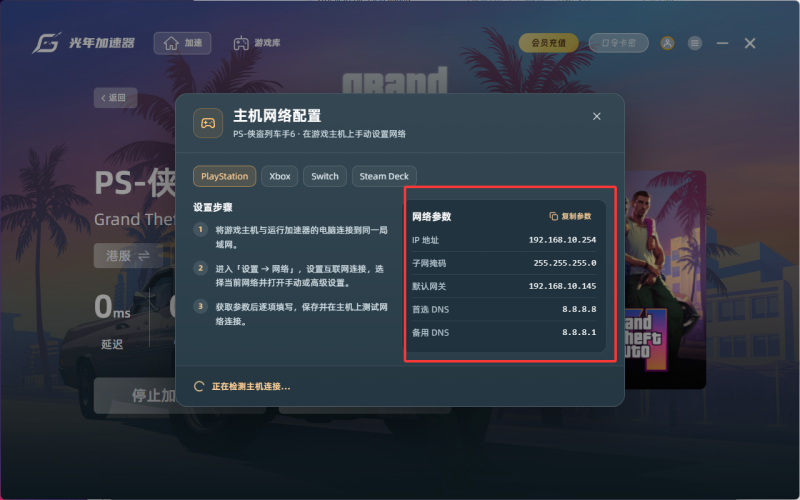
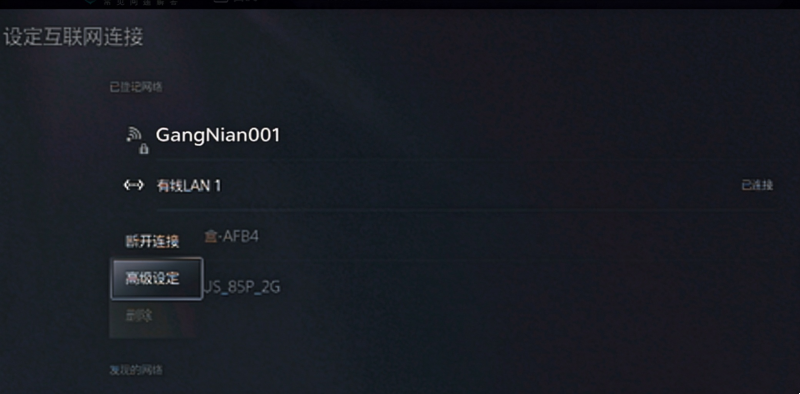
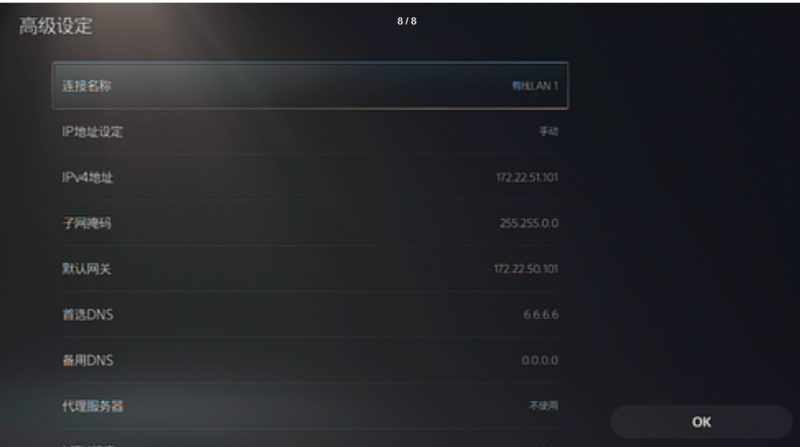
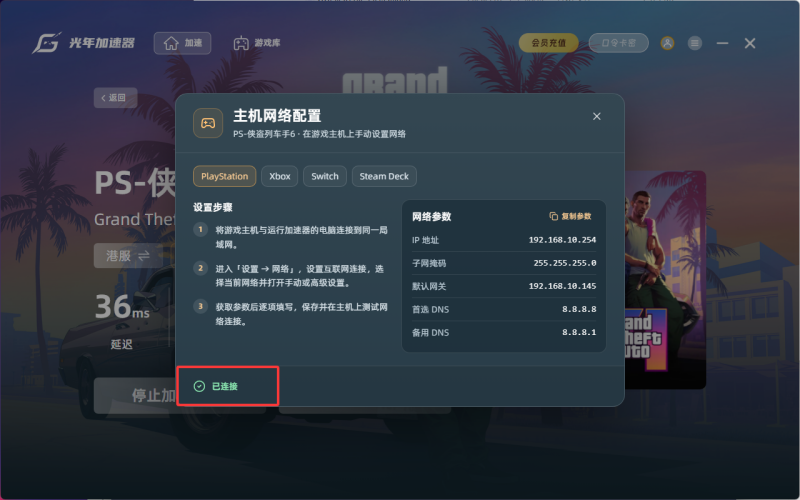
Uncle Encyclopedia · 586 views: once acceleration succeeds, theConsole network configuration pagewill pop up automatically. Enter the LAN-shared acceleration parameters shown on the right into your console: on PS5, go to "Settings → Network → Set Internet Connection → select Wi-Fi (choose Advanced Settings if wired)", then fill in the IP, subnet mask, gateway, and DNS exactly as shown on the page (names may differ between simplified/traditional system translations—match the corresponding fields).
Console network configuration popup: setup steps and network parameters · Screenshot source: official Guangnian Booster tutorialPS5: Set up Internet Connection, choose WiFi or LAN advanced settings · Screenshot source: official Guangnian Booster tutorialPS5 advanced settings: enter the IP address, subnet mask, gateway, and DNS per the popup parameters · Screenshot source: official Guangnian Booster tutorial
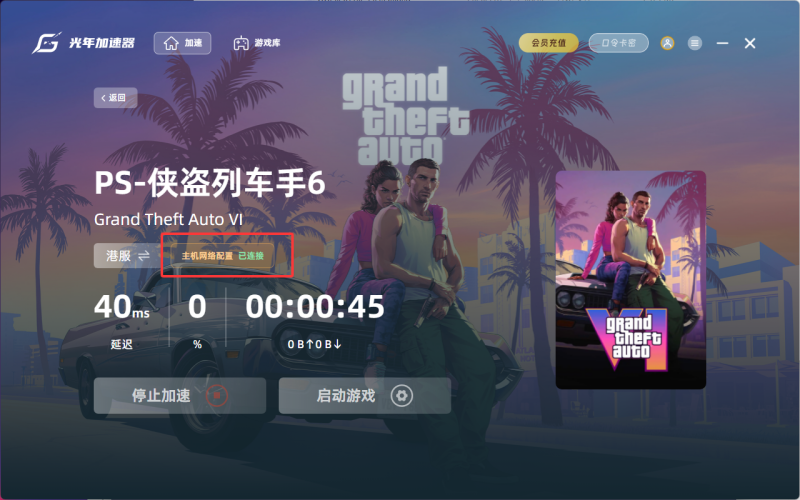
Nailin Queen · 1.106 million views: when the client shows "Connected", acceleration is active—just launch the game to test. To view the parameters again later, click "Console Network Settings" to the right of the region/server on the acceleration details page.
After entering the parameters, run "Connection Test" to verify first · Screenshot source: official Guangnian Booster tutorialBoost successful: PS-Grand Theft Auto VI connected · Screenshot source: official Guangnian Booster tutorial
Xbox, Switch, and Steam Deck are configured the same way, just with parameters in different locations. If a game isn't listed yet, submit a request in the user feedback group.
iWhere is the password entry?Open the Lightyear Accelerator client, thenProfile / RedeemEnter page passwordGTA6(all caps) to receive 7 days of time. Instructions for claiming the QQ group monthly card are in the group announcement and group files. Group number: 1127438628,What Is Guangnian Accelerator.
November Free-to-Use Boosting Game List
Starting in November, Lightyear Accelerator has enabledFree Limited-Time Boostfor the following games (per official announcement, seeGTA6 Console Boost Steps (Using PS5 as an Example)), with more titles to be added:
Guangnian Booster November Free Games (As of Today)
Game
Free-trial region
Grand Theft Auto VI (GTA6, includes console boost)
HK Server
PUBG
Steam / Asia server
ROB RUN
EU / NA Server
WARDOGS
SEA / East Asia / West Asia / NA / EU
ArcheAge Chronicles
Asia (HK / KR) / EU / NA
Call of Duty: Modern Warfare 4
HK Server
Rainbow Six: Siege
Asia Server
!Free giveaway notice:Free Access GuideNo time consumedIt also boosts acceleration; the list and deadlines are subject to real-time display in the client; GTA6 Hong Kong service includes console acceleration, so console players also enjoy the free access.
Frequently asked questions
How to claim 7 days of boost time with Guangnian Booster?
Open the Guangnian Booster PC client, enter the code "GTA6" (all caps) on the Personal Center / Redemption page, and 7 days of boost time will be credited instantly.
How to claim the 30-day monthly pass?
Join the official GTA6 Chinese Site QQ group 1127438628 and claim the 30-day monthly pass following the instructions in the group announcement and group files. Both perks can be stacked.
Can I boost consoles without a console boost box?
Yes. Starting from version 1.1.38, a single PC running the Guangnian client can provide boosting for PS5 / PS4 / Xbox / Switch / Steam Deck on the same network. Just configure the proxy following the steps in the article.
Is GTA6 boosting paid?
GTA6 Hong Kong Server (including console boosting) is currently on the November free list, and boosting doesn't consume time; the free list and end time are subject to what's displayed in real time in the client.